Full Stack for Backend Devs: Reactive UIs with FastAPI & HTMX (No React Required)
Tired of 'npm install' and complex state management? Learn how to build modern, dynamic user interfaces using only Python, HTML, and HTMX.
Moshiour Rahman
Advertisement
The “Frontend Fatigue” is Real
You are a backend engineer. You know Python, SQL, and system architecture. You want to build a simple dashboard or a tool.
But to make it “modern” (no full page reloads), you’re told you need:
- React/Vue/Angular
- A build step (Vite/Webpack)
- State management (Redux/Zustand)
- Client-side routing
- JSON API serialization
Suddenly, your simple admin panel is a distributed system with two codebases.
Enter HTMX. It allows you to access AJAX, CSS Transitions, WebSockets and Server Sent Events directly in HTML, using attributes.
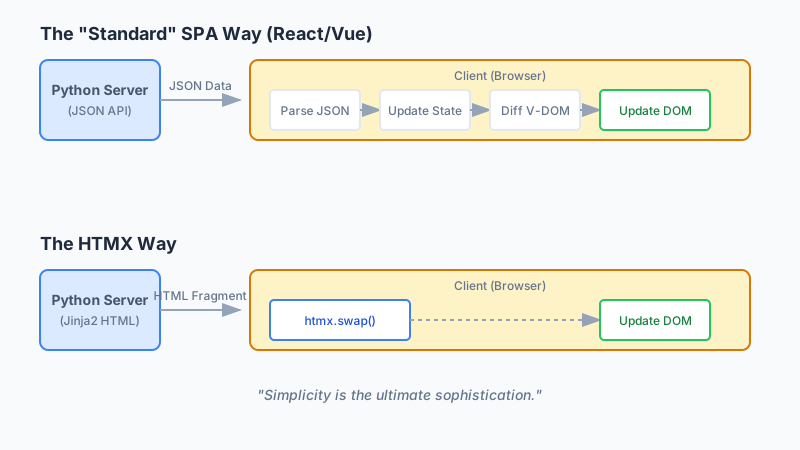
In this tutorial, we will build a Live User Search and Inline Editor using FastAPI and HTMX. No console.log, no npm, just Python.
The Stack
- Backend: FastAPI (Python 3.10+)
- Templating: Jinja2
- Frontend: HTMX (via CDN)
- Database: SQLite (for simplicity)
Setup
pip install fastapi uvicorn jinja2 python-multipart
mkdir htmx-app && cd htmx-app
touch main.py templates/index.html
1. The “React Way” vs. The “HTMX Way”
Look at the diagram above again. The React loop involves client-side state management, V-DOM diffing, and JSON parsing. The HTMX loop is just… HTML.
The React Way (Live Search):
- Create
SearchComponent.jsx. - Add
useStatefor query and results. - Add
useEffectto trigger fetch on change. - Write
fetch('/api/search'). - Handle
isLoading,error,data. - Map over
datato render rows.
The HTMX Way:
<input type="text"
       name="q"
       hx-get="/search"
       hx-trigger="keyup changed delay:500ms"
       hx-target="#results">
<div id="results"></div>
That’s it. When you type, it hits /search, waits 500ms, and swaps the HTML response into #results.
2. Building the Backend (FastAPI)
Let’s implement main.py. Note that we return HTML, not JSON.
from fastapi import FastAPI, Request, Form
from fastapi.responses import HTMLResponse
from fastapi.templating import Jinja2Templates
from typing import Annotated

app = FastAPI()
templates = Jinja2Templates(directory="templates")

# Mock Database
USERS = [
    {"id": 1, "name": "Alice Johnson", "role": "Engineer"},
    {"id": 2, "name": "Bob Smith", "role": "Designer"},
    {"id": 3, "name": "Charlie Davis", "role": "Manager"},
]

@app.get("/", response_class=HTMLResponse)
async def index(request: Request):
    return templates.TemplateResponse("index.html", {"request": request, "users": USERS})

@app.get("/search", response_class=HTMLResponse)
async def search_users(request: Request, q: str = ""):
    # Filter users (Case insensitive)
    results = [u for u in USERS if q.lower() in u["name"].lower()]

    # Return strictly the rows (HTML fragment), not the full page
    return templates.TemplateResponse("partials/rows.html", {"request": request, "users": results})

@app.post("/users/{user_id}/edit", response_class=HTMLResponse)
async def edit_user(request: Request, user_id: int):
    # Return the "Edit Mode" row
    user = next((u for u in USERS if u["id"] == user_id), None)
    return templates.TemplateResponse("partials/edit_row.html", {"request": request, "user": user})

@app.post("/users/{user_id}/update", response_class=HTMLResponse)
async def update_user(request: Request, user_id: int, name: Annotated[str, Form()], role: Annotated[str, Form()]):
    # Update DB
    user = next((u for u in USERS if u["id"] == user_id), None)
    if user:
        user["name"] = name
        user["role"] = role

    # Return the "Read Mode" row (Updated)
    return templates.TemplateResponse("partials/row.html", {"request": request, "user": user})
3. The Frontend (HTML + Jinja2)
We need a base template and some partials.
templates/index.html:
<!DOCTYPE html>
<html>
<head>
    <title>FastAPI + HTMX</title>
    <script src="https://unpkg.com/htmx.org@2.0.0"></script>
    <link href="https://cdn.jsdelivr.net/npm/tailwindcss@2.2.19/dist/tailwind.min.css" rel="stylesheet">
</head>
<body class="bg-gray-100 p-10">
    <div class="max-w-2xl mx-auto bg-white p-6 rounded shadow">
        <h1 class="text-2xl mb-4">Team Directory</h1>

        <!-- Live Search Input -->
        <input type="text"
               name="q"
               class="border p-2 w-full mb-4 rounded"
               placeholder="Search users..."
               hx-get="/search"
               hx-trigger="keyup changed delay:500ms"
               hx-target="#tbody">

        <table class="w-full text-left">
            <thead>
                <tr class="border-b"><th class="p-2">Name</th><th class="p-2">Role</th><th class="p-2">Action</th></tr>
            </thead>
            <tbody id="tbody">
                <!-- Initial Load -->
                {% for user in users %}
                    {% include 'partials/row.html' %}
                {% endfor %}
            </tbody>
        </table>
    </div>
</body>
</html>
templates/partials/row.html (The Read-Only Row):
<tr class="border-b hover:bg-gray-50">
    <td class="p-2">{{ user.name }}</td>
    <td class="p-2">{{ user.role }}</td>
    <td class="p-2">
        <button class="text-blue-500 hover:underline"
                hx-post="/users/{{ user.id }}/edit"
                hx-trigger="click"
                hx-target="closest tr"
                hx-swap="outerHTML">
            Edit
        </button>
    </td>
</tr>
templates/partials/edit_row.html (The Editable Row):
<tr class="bg-blue-50 border-b">
    <td class="p-2">
        <input type="text" name="name" value="{{ user.name }}" class="border p-1 rounded">
    </td>
    <td class="p-2">
        <input type="text" name="role" value="{{ user.role }}" class="border p-1 rounded">
    </td>
    <td class="p-2">
        <button class="bg-blue-500 text-white px-3 py-1 rounded"
                hx-post="/users/{{ user.id }}/update"
                hx-include="closest tr"
                hx-target="closest tr"
                hx-swap="outerHTML">
            Save
        </button>
        <button class="text-gray-500 ml-2"
                hx-get="/"
                hx-select="#row-{{ user.id }}" <!-- Trick to reset: just reload page content for this row or keep state on server -->
                hx-target="closest tr"
                hx-swap="outerHTML">
            Cancel
        </button>
    </td>
</tr>
Note: For “Cancel”, a robust real-world app would hit a specific endpoint to return the original row.
Why This Matters for Revenue
As engineers, we often get lost in “resume-driven development.” We choose React because it looks good on a CV.
But if you are building a SaaS, an Internal Tool, or a MVP:
- Speed: You can build this in 1 hour. React would take 4 (setup + api + types).
- Maintenance: One language (Python). One codebase.
- SEO: It’s server-side rendered by default. Google loves it.
When NOT to use HTMX
HTMX is amazing, but it’s not for everything. Avoid it if:
- You are building a complex offline-first PWA (Progressive Web App).
- You need extremely high-fidelity UI interactions (drag-and-drop canvas, games).
- You have a dedicated frontend team that works separately.
Conclusion
“Full Stack” doesn’t have to mean “Two Stacks.” By leveraging hypermedia attributes with HTMX, you can reclaim the simplicity of the early web with the interactivity of modern apps.
Stop fighting the DOM. Let the server do the work.
Advertisement
Moshiour Rahman
Software Architect & AI Engineer
Enterprise software architect with deep expertise in financial systems, distributed architecture, and AI-powered applications. Building large-scale systems at Fortune 500 companies. Specializing in LLM orchestration, multi-agent systems, and cloud-native solutions. I share battle-tested patterns from real enterprise projects.
Related Articles
FastAPI Tutorial Part 1: Introduction and Setup - Build Modern Python APIs
Start your FastAPI journey with this comprehensive guide. Learn installation, create your first API, understand async Python, and explore automatic documentation.
PythonFastAPI Tutorial: Build Modern Python APIs
Master FastAPI for building high-performance Python APIs. Learn async endpoints, validation, authentication, database integration, and deployment.
PythonFastAPI Tutorial Part 14: File Uploads and Storage
Handle file uploads in FastAPI. Learn form data, file validation, cloud storage integration with S3, and serving static files.
Comments
Comments are powered by GitHub Discussions.
Configure Giscus at giscus.app to enable comments.