Docker Best Practices for Production: Complete Guide
Master Docker best practices for production deployments. Learn image optimization, security hardening, multi-stage builds, and container orchestration.
Moshiour Rahman
Advertisement
Why Docker Best Practices Matter
Following Docker best practices results in smaller images, faster deployments, better security, and easier maintenance. This guide covers essential patterns for production.
Image Optimization
Use Official Base Images
# Good - official, minimal image
FROM node:18-alpine

# Avoid - generic or unverified images
FROM random-user/node-custom
Multi-Stage Builds
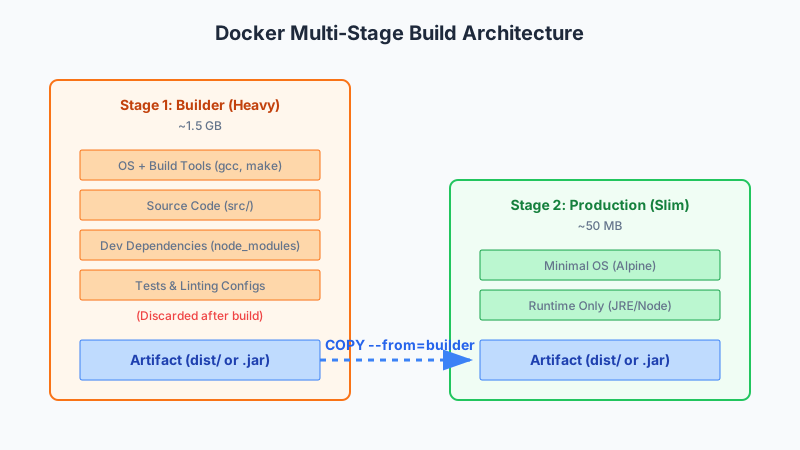
# Build stage
FROM node:18-alpine AS builder
WORKDIR /app
COPY package*.json ./
RUN npm ci --only=production
COPY . .
RUN npm run build

# Production stage
FROM node:18-alpine AS production
WORKDIR /app
COPY --from=builder /app/dist ./dist
COPY --from=builder /app/node_modules ./node_modules
COPY package*.json ./

USER node
EXPOSE 3000
CMD ["node", "dist/main.js"]
Java Multi-Stage Build
# Build stage
FROM maven:3.8-openjdk-17 AS builder
WORKDIR /app
COPY pom.xml .
RUN mvn dependency:go-offline
COPY src ./src
RUN mvn package -DskipTests

# Production stage
FROM eclipse-temurin:17-jre-alpine
WORKDIR /app
COPY --from=builder /app/target/*.jar app.jar

RUN addgroup -S appgroup && adduser -S appuser -G appgroup
USER appuser

EXPOSE 8080
ENTRYPOINT ["java", "-jar", "app.jar"]
Minimize Layers
# Bad - multiple RUN commands
RUN apt-get update
RUN apt-get install -y curl
RUN apt-get install -y git
RUN rm -rf /var/lib/apt/lists/*

# Good - combined RUN command
RUN apt-get update && \
    apt-get install -y --no-install-recommends \
        curl \
        git && \
    rm -rf /var/lib/apt/lists/*
Order Layers by Change Frequency
FROM node:18-alpine

WORKDIR /app

# Rarely changes - install dependencies first
COPY package*.json ./
RUN npm ci --only=production

# Changes frequently - copy source last
COPY . .

RUN npm run build

CMD ["npm", "start"]
Use .dockerignore
# .dockerignore
node_modules
npm-debug.log
Dockerfile
.dockerignore
.git
.gitignore
.env
*.md
coverage
.nyc_output
dist
Security Best Practices
Non-Root User
FROM node:18-alpine

# Create non-root user
RUN addgroup -S appgroup && adduser -S appuser -G appgroup

WORKDIR /app
COPY --chown=appuser:appgroup . .

# Switch to non-root user
USER appuser

CMD ["node", "app.js"]
Scan for Vulnerabilities
# Using Docker Scout
docker scout cves myimage:latest

# Using Trivy
trivy image myimage:latest

# Using Snyk
snyk container test myimage:latest
Pin Versions
# Good - pinned versions
FROM node:18.19.0-alpine3.19
RUN apk add --no-cache curl=8.5.0-r0

# Avoid - unpinned versions
FROM node:latest
RUN apk add curl
Don’t Store Secrets in Images
# Bad - secrets in image
ENV API_KEY=supersecretkey
COPY .env /app/.env

# Good - use runtime secrets
# Pass at runtime: docker run -e API_KEY=xxx
ENV API_KEY=""
Read-Only Filesystem
# docker-compose.yml
services:
  app:
    image: myapp:latest
    read_only: true
    tmpfs:
      - /tmp
      - /var/run
Security Options
services:
  app:
    image: myapp:latest
    security_opt:
      - no-new-privileges:true
    cap_drop:
      - ALL
    cap_add:
      - NET_BIND_SERVICE
Health Checks
Dockerfile Health Check
FROM node:18-alpine

WORKDIR /app
COPY . .
RUN npm ci

HEALTHCHECK --interval=30s --timeout=10s --start-period=5s --retries=3 \
    CMD curl -f http://localhost:3000/health || exit 1

CMD ["npm", "start"]
Compose Health Check
services:
  app:
    image: myapp:latest
    healthcheck:
      test: ["CMD", "curl", "-f", "http://localhost:3000/health"]
      interval: 30s
      timeout: 10s
      retries: 3
      start_period: 40s
Resource Limits
Docker Compose
services:
  app:
    image: myapp:latest
    deploy:
      resources:
        limits:
          cpus: '0.5'
          memory: 512M
        reservations:
          cpus: '0.25'
          memory: 256M
Docker Run
docker run -d \
    --memory="512m" \
    --memory-swap="1g" \
    --cpus="0.5" \
    --pids-limit=100 \
    myapp:latest
Logging Best Practices
Log to stdout/stderr
# Application should log to stdout
CMD ["node", "app.js"]

# Don't log to files inside container
# Bad: CMD ["node", "app.js", ">>", "/var/log/app.log"]
Configure Logging Driver
services:
  app:
    image: myapp:latest
    logging:
      driver: "json-file"
      options:
        max-size: "10m"
        max-file: "3"
Networking
Use Custom Networks
services:
  app:
    image: myapp:latest
    networks:
      - frontend
      - backend

  db:
    image: postgres:15
    networks:
      - backend

networks:
  frontend:
  backend:
    internal: true  # No external access
Don’t Expose Unnecessary Ports
services:
  db:
    image: postgres:15
    # Only expose to other containers, not host
    expose:
      - "5432"
    # Don't use ports: unless needed externally
Production Docker Compose
Complete Example
version: '3.8'

services:
  app:
    image: myapp:${VERSION:-latest}
    build:
      context: .
      dockerfile: Dockerfile
      args:
        - NODE_ENV=production
    restart: unless-stopped
    ports:
      - "3000:3000"
    environment:
      - NODE_ENV=production
      - DATABASE_URL=${DATABASE_URL}
    env_file:
      - .env.production
    healthcheck:
      test: ["CMD", "curl", "-f", "http://localhost:3000/health"]
      interval: 30s
      timeout: 10s
      retries: 3
    deploy:
      resources:
        limits:
          cpus: '1'
          memory: 1G
    logging:
      driver: "json-file"
      options:
        max-size: "50m"
        max-file: "5"
    networks:
      - app-network
    depends_on:
      db:
        condition: service_healthy
      redis:
        condition: service_healthy

  db:
    image: postgres:15-alpine
    restart: unless-stopped
    volumes:
      - postgres_data:/var/lib/postgresql/data
    environment:
      - POSTGRES_DB=${DB_NAME}
      - POSTGRES_USER=${DB_USER}
      - POSTGRES_PASSWORD=${DB_PASSWORD}
    healthcheck:
      test: ["CMD-SHELL", "pg_isready -U ${DB_USER} -d ${DB_NAME}"]
      interval: 10s
      timeout: 5s
      retries: 5
    networks:
      - app-network

  redis:
    image: redis:7-alpine
    restart: unless-stopped
    command: redis-server --appendonly yes
    volumes:
      - redis_data:/data
    healthcheck:
      test: ["CMD", "redis-cli", "ping"]
      interval: 10s
      timeout: 5s
      retries: 5
    networks:
      - app-network

  nginx:
    image: nginx:alpine
    restart: unless-stopped
    ports:
      - "80:80"
      - "443:443"
    volumes:
      - ./nginx/nginx.conf:/etc/nginx/nginx.conf:ro
      - ./nginx/ssl:/etc/nginx/ssl:ro
    depends_on:
      - app
    networks:
      - app-network

networks:
  app-network:
    driver: bridge

volumes:
  postgres_data:
  redis_data:
CI/CD Integration
Build and Push Script
#!/bin/bash
set -e

IMAGE_NAME="myuser/myapp"
VERSION=$(git describe --tags --always)

# Build image
docker build -t ${IMAGE_NAME}:${VERSION} -t ${IMAGE_NAME}:latest .

# Scan for vulnerabilities
docker scout cves ${IMAGE_NAME}:${VERSION}

# Push to registry
docker push ${IMAGE_NAME}:${VERSION}
docker push ${IMAGE_NAME}:latest
GitHub Actions
name: Build and Push

on:
  push:
    branches: [main]

jobs:
  build:
    runs-on: ubuntu-latest
    steps:
      - uses: actions/checkout@v4

      - name: Set up Docker Buildx
        uses: docker/setup-buildx-action@v3

      - name: Login to DockerHub
        uses: docker/login-action@v3
        with:
          username: ${{ secrets.DOCKER_USERNAME }}
          password: ${{ secrets.DOCKER_TOKEN }}

      - name: Build and push
        uses: docker/build-push-action@v5
        with:
          context: .
          push: true
          tags: |
            myuser/myapp:${{ github.sha }}
            myuser/myapp:latest
          cache-from: type=gha
          cache-to: type=gha,mode=max
Debugging Tips
Interactive Shell
# Running container
docker exec -it container_name sh

# Start with shell
docker run -it --rm myimage:latest sh

# Override entrypoint
docker run -it --entrypoint sh myimage:latest
Inspect Image
# View layers
docker history myimage:latest

# View metadata
docker inspect myimage:latest

# View filesystem
docker run --rm -it myimage:latest ls -la /app
Summary
| Practice | Impact |
|---|---|
| Multi-stage builds | Smaller images |
| Non-root user | Better security |
| Health checks | Reliable deployments |
| Resource limits | Predictable performance |
| Pin versions | Reproducible builds |
Following these Docker best practices ensures your containers are secure, efficient, and production-ready.
Advertisement
Moshiour Rahman
Software Architect & AI Engineer
Enterprise software architect with deep expertise in financial systems, distributed architecture, and AI-powered applications. Building large-scale systems at Fortune 500 companies. Specializing in LLM orchestration, multi-agent systems, and cloud-native solutions. I share battle-tested patterns from real enterprise projects.
Related Articles
Docker Compose for Microservices: Complete Development Guide
Master Docker Compose for local microservices development. Learn multi-container orchestration, networking, volumes, and production-ready configurations.
DevOpsKubernetes for Beginners: Complete Guide to Container Orchestration
Learn Kubernetes from scratch. Understand pods, deployments, services, and how to deploy your first application to a Kubernetes cluster with practical examples.
DevOpsDocker Compose Tutorial: Building Multi-Container Applications
Master Docker Compose for multi-container applications. Learn to define, configure, and run complex application stacks with practical examples including web apps with databases.
Comments
Comments are powered by GitHub Discussions.
Configure Giscus at giscus.app to enable comments.