Multi-Agent Systems: Build AI Teams with CrewAI & LangGraph
Master multi-agent orchestration with CrewAI and LangGraph. Build specialized AI teams that collaborate, delegate tasks, and solve complex problems together.
Moshiour Rahman
Advertisement
AI Agents Mastery Series
This is Part 5 of our comprehensive AI Agents series.
| Part | Topic | Level |
|---|---|---|
| 1 | Fundamentals - Build from Scratch | Beginner |
| 2 | LangGraph Deep Dive | Intermediate |
| 3 | Local LLMs with Ollama | Intermediate |
| 4 | Tool-Using Agents | Intermediate |
| 5 | Multi-Agent Systems | Advanced |
| 6 | Production Deployment | Advanced |
Why Multiple Agents?
Single agents hit limits. Multi-agent systems unlock new capabilities:
| Single Agent | Multi-Agent System |
|---|---|
| One perspective | Multiple specialized viewpoints |
| Context overload | Distributed context |
| Single point of failure | Resilient architecture |
| Limited expertise | Deep specialization |
| Sequential only | Parallel execution |
Real-World Analogy
Think of a software company:
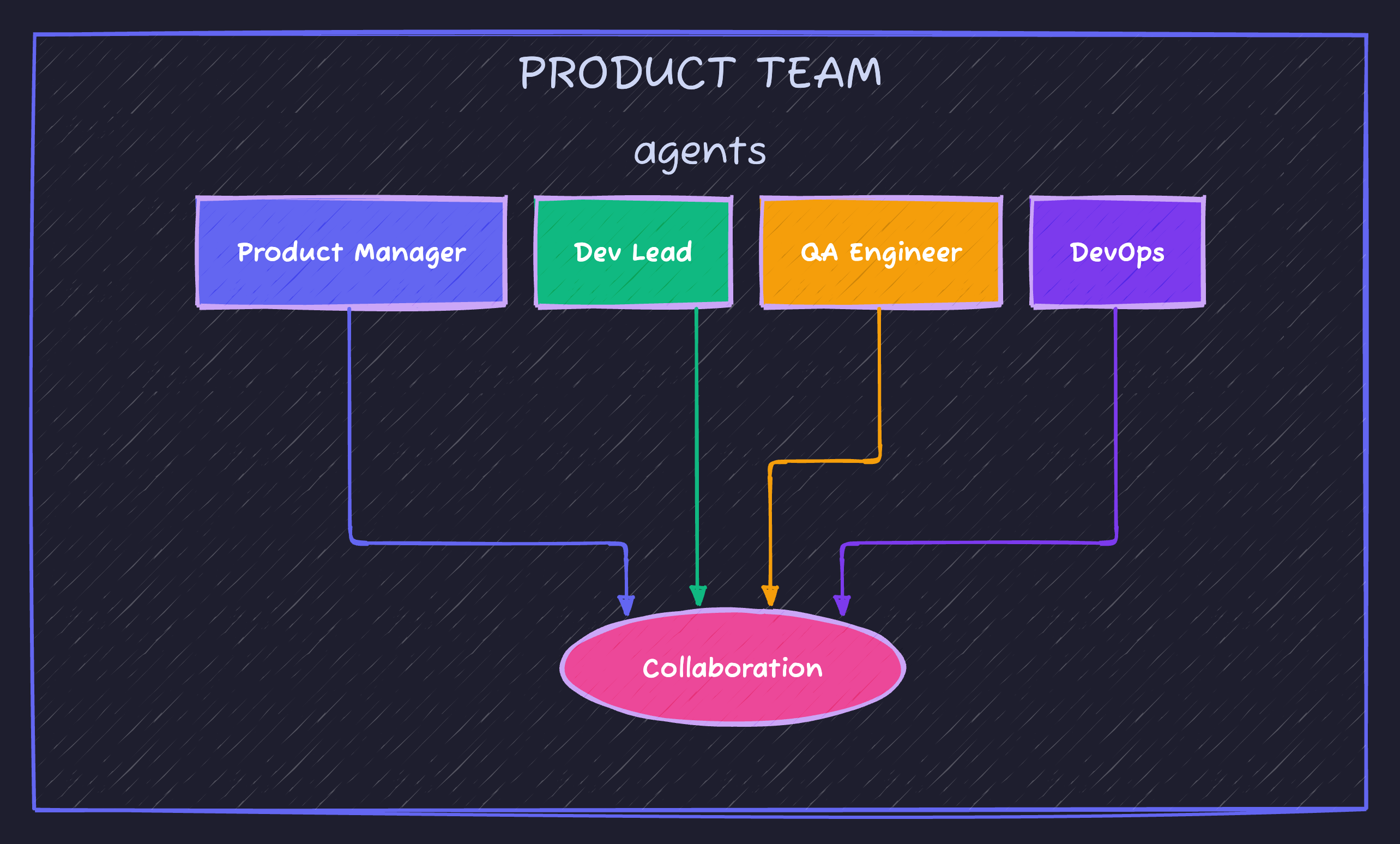
Each person has specialized skills. They collaborate to ship products. Multi-agent AI works the same way.
Multi-Agent Patterns
| Pattern | Description | Use Case |
|---|---|---|
| Sequential | Agents work one after another | Pipeline processing |
| Hierarchical | Manager delegates to workers | Complex projects |
| Collaborative | Agents discuss and decide | Research, brainstorming |
| Competitive | Agents propose, best wins | Creative tasks |
| Parallel | Agents work simultaneously | Independent subtasks |
Setup
pip install crewai crewai-tools langgraph langchain-openai python-dotenv# .env
OPENAI_API_KEY=your-keyCrewAI: Multi-Agent Made Simple
CrewAI is the leading framework for multi-agent systems. It uses a crew metaphor:
- Agents: Specialized team members
- Tasks: Work assignments
- Crew: The team that executes tasks
- Process: How tasks flow (sequential, hierarchical)
Your First Crew
# first_crew.py
import os
from dotenv import load_dotenv
from crewai import Agent, Task, Crew, Process
from crewai_tools import SerperDevTool

load_dotenv()

# Define agents
researcher = Agent(
    role="Research Analyst",
    goal="Find comprehensive information on given topics",
    backstory="""You are an expert research analyst with years of experience
    finding and synthesizing information from various sources. You're known
    for your thoroughness and attention to detail.""",
    verbose=True,
    tools=[SerperDevTool()]  # Web search capability
)

writer = Agent(
    role="Content Writer",
    goal="Create engaging, well-structured content",
    backstory="""You are a skilled content writer who transforms complex
    research into clear, engaging articles. You have a talent for making
    technical topics accessible to general audiences.""",
    verbose=True
)

editor = Agent(
    role="Editor",
    goal="Ensure content quality and accuracy",
    backstory="""You are a meticulous editor with an eye for detail.
    You ensure all content is accurate, well-organized, and free of errors.
    You also verify that claims are supported by research.""",
    verbose=True
)

# Define tasks
research_task = Task(
    description="""Research the topic: {topic}

    Find:
    - Key facts and statistics
    - Recent developments
    - Expert opinions
    - Relevant examples

    Provide a comprehensive research brief.""",
    expected_output="A detailed research brief with sources",
    agent=researcher
)

writing_task = Task(
    description="""Using the research provided, write an engaging article about {topic}.

    Requirements:
    - Clear introduction
    - Well-organized sections
    - Practical examples
    - Actionable takeaways

    Target length: 500-800 words""",
    expected_output="A well-written article in markdown format",
    agent=writer
)

editing_task = Task(
    description="""Review and improve the article.

    Check for:
    - Factual accuracy
    - Grammar and spelling
    - Flow and readability
    - Consistency

    Provide the final polished version.""",
    expected_output="The final, polished article ready for publication",
    agent=editor
)

# Create the crew
content_crew = Crew(
    agents=[researcher, writer, editor],
    tasks=[research_task, writing_task, editing_task],
    process=Process.sequential,  # Tasks run in order
    verbose=True
)

# Run the crew
if __name__ == "__main__":
    result = content_crew.kickoff(inputs={"topic": "AI Agents in 2025"})
    print("\n" + "="*60)
    print("FINAL OUTPUT")
    print("="*60)
    print(result)
Execution Flow
1. Research Analyst
   └── Searches web, compiles research brief
           │
           ▼
2. Content Writer
   └── Receives research, writes article
           │
           ▼
3. Editor
   └── Reviews, polishes, outputs final article
Hierarchical Crews
For complex projects, use a manager agent to coordinate:
# hierarchical_crew.py
from crewai import Agent, Task, Crew, Process

# Manager agent
project_manager = Agent(
    role="Project Manager",
    goal="Coordinate team to deliver high-quality software features",
    backstory="""You are an experienced PM who excels at breaking down
    complex requirements into actionable tasks and coordinating team efforts.""",
    verbose=True,
    allow_delegation=True  # Can assign work to others
)

# Specialist agents
backend_dev = Agent(
    role="Backend Developer",
    goal="Design and implement robust backend solutions",
    backstory="Senior backend developer specializing in Python and APIs.",
    verbose=True
)

frontend_dev = Agent(
    role="Frontend Developer",
    goal="Create intuitive and responsive user interfaces",
    backstory="Frontend expert with deep React and TypeScript experience.",
    verbose=True
)

qa_engineer = Agent(
    role="QA Engineer",
    goal="Ensure software quality through comprehensive testing",
    backstory="Detail-oriented QA with expertise in test automation.",
    verbose=True
)

# High-level task for manager
feature_task = Task(
    description="""Implement a new user authentication feature.

    Requirements:
    - JWT-based authentication
    - Login/logout functionality
    - Password reset flow
    - Frontend integration

    Coordinate with your team to deliver this feature.""",
    expected_output="Complete feature implementation with documentation",
    agent=project_manager
)

# Create hierarchical crew
dev_crew = Crew(
    agents=[project_manager, backend_dev, frontend_dev, qa_engineer],
    tasks=[feature_task],
    process=Process.hierarchical,  # Manager coordinates
    manager_agent=project_manager,
    verbose=True
)

result = dev_crew.kickoff()
Advanced CrewAI Patterns
Agent Memory
Agents can remember across sessions:
from crewai import Agent

agent_with_memory = Agent(
    role="Customer Support",
    goal="Help customers with their issues",
    backstory="Experienced support agent who remembers customer history.",
    memory=True,  # Enable memory
    verbose=True
)
Custom Tools
from crewai_tools import BaseTool
from pydantic import BaseModel, Field

class DatabaseQueryInput(BaseModel):
    query: str = Field(description="SQL query to execute")

class DatabaseTool(BaseTool):
    name: str = "Database Query"
    description: str = "Execute SQL queries against the database"
    args_schema: type[BaseModel] = DatabaseQueryInput

    def _run(self, query: str) -> str:
        # Implement your database logic
        return f"Query results for: {query}"

# Use in agent
db_agent = Agent(
    role="Data Analyst",
    goal="Analyze data and provide insights",
    backstory="Expert at querying databases and interpreting data.",
    tools=[DatabaseTool()],
    verbose=True
)
Task Dependencies
# Tasks can depend on each other
data_task = Task(
    description="Gather data from sources",
    expected_output="Raw data",
    agent=data_collector
)

analysis_task = Task(
    description="Analyze the collected data",
    expected_output="Analysis report",
    agent=analyst,
    context=[data_task]  # Depends on data_task
)
Multi-Agent with LangGraph
For maximum control, build multi-agent systems with LangGraph:
# langgraph_multiagent.py
from typing import Annotated, TypedDict, Literal
from langgraph.graph import StateGraph, START, END
from langgraph.graph.message import add_messages
from langchain_openai import ChatOpenAI
from langchain_core.messages import HumanMessage, AIMessage, SystemMessage

# Shared state
class MultiAgentState(TypedDict):
    messages: Annotated[list, add_messages]
    current_agent: str
    research: str
    draft: str
    final_output: str
    iteration: int

# Create specialized LLMs
researcher_llm = ChatOpenAI(model="gpt-4o-mini", temperature=0.7)
writer_llm = ChatOpenAI(model="gpt-4o-mini", temperature=0.8)
critic_llm = ChatOpenAI(model="gpt-4o-mini", temperature=0.3)

def researcher_agent(state: MultiAgentState) -> MultiAgentState:
    """Research agent gathers information."""
    messages = [
        SystemMessage(content="""You are a research expert. Your job is to
        gather comprehensive information on the given topic. Focus on:
        - Key facts and data
        - Recent developments
        - Different perspectives
        Provide your findings in a structured format."""),
        HumanMessage(content=state["messages"][-1].content if state["messages"] else "Research AI agents")
    ]

    response = researcher_llm.invoke(messages)

    return {
        "research": response.content,
        "current_agent": "writer",
        "messages": [AIMessage(content=f"[Researcher]: Completed research\n{response.content[:200]}...")]
    }

def writer_agent(state: MultiAgentState) -> MultiAgentState:
    """Writer agent creates content based on research."""
    messages = [
        SystemMessage(content="""You are a skilled content writer.
        Using the research provided, create an engaging, well-structured article.
        Make it informative yet accessible."""),
        HumanMessage(content=f"Research findings:\n{state['research']}\n\nWrite an article based on this research.")
    ]

    response = writer_llm.invoke(messages)

    return {
        "draft": response.content,
        "current_agent": "critic",
        "messages": [AIMessage(content=f"[Writer]: Created draft\n{response.content[:200]}...")]
    }

def critic_agent(state: MultiAgentState) -> MultiAgentState:
    """Critic agent reviews and improves content."""
    messages = [
        SystemMessage(content="""You are a critical editor.
        Review the draft for:
        - Accuracy
        - Clarity
        - Engagement
        - Structure

        Either approve it or request specific improvements.
        If improvements needed, clearly state what should change.
        If approved, respond with 'APPROVED: ' followed by the final version."""),
        HumanMessage(content=f"Please review this draft:\n\n{state['draft']}")
    ]

    response = critic_llm.invoke(messages)

    if "APPROVED:" in response.content:
        final = response.content.split("APPROVED:", 1)[1].strip()
        return {
            "final_output": final,
            "current_agent": "done",
            "messages": [AIMessage(content="[Critic]: Approved final version")]
        }
    else:
        return {
            "current_agent": "writer",
            "iteration": state.get("iteration", 0) + 1,
            "messages": [AIMessage(content=f"[Critic]: Requesting revisions\n{response.content[:200]}...")]
        }

def route_next_agent(state: MultiAgentState) -> Literal["researcher", "writer", "critic", "end"]:
    """Determine which agent runs next."""
    current = state.get("current_agent", "researcher")

    # Limit iterations to prevent infinite loops
    if state.get("iteration", 0) > 3:
        return "end"

    if current == "done":
        return "end"

    return current

# Build the graph
builder = StateGraph(MultiAgentState)

# Add agent nodes
builder.add_node("researcher", researcher_agent)
builder.add_node("writer", writer_agent)
builder.add_node("critic", critic_agent)

# Add edges
builder.add_edge(START, "researcher")
builder.add_edge("researcher", "writer")
builder.add_edge("writer", "critic")

# Conditional edge from critic - either back to writer or end
builder.add_conditional_edges(
    "critic",
    route_next_agent,
    {
        "writer": "writer",
        "end": END
    }
)

multi_agent_graph = builder.compile()

def run_multi_agent(topic: str) -> str:
    """Run the multi-agent content creation system."""
    print(f"\n{'='*60}")
    print(f"🤖 MULTI-AGENT SYSTEM")
    print(f"Topic: {topic}")
    print('='*60)

    result = multi_agent_graph.invoke({
        "messages": [HumanMessage(content=topic)],
        "current_agent": "researcher",
        "research": "",
        "draft": "",
        "final_output": "",
        "iteration": 0
    })

    # Show agent flow
    print("\n📋 Agent Activity:")
    for msg in result["messages"]:
        if hasattr(msg, 'content'):
            print(f"  {msg.content[:100]}...")

    return result.get("final_output", result.get("draft", "No output generated"))

if __name__ == "__main__":
    output = run_multi_agent("The impact of AI agents on software development in 2025")
    print("\n" + "="*60)
    print("FINAL OUTPUT")
    print("="*60)
    print(output)
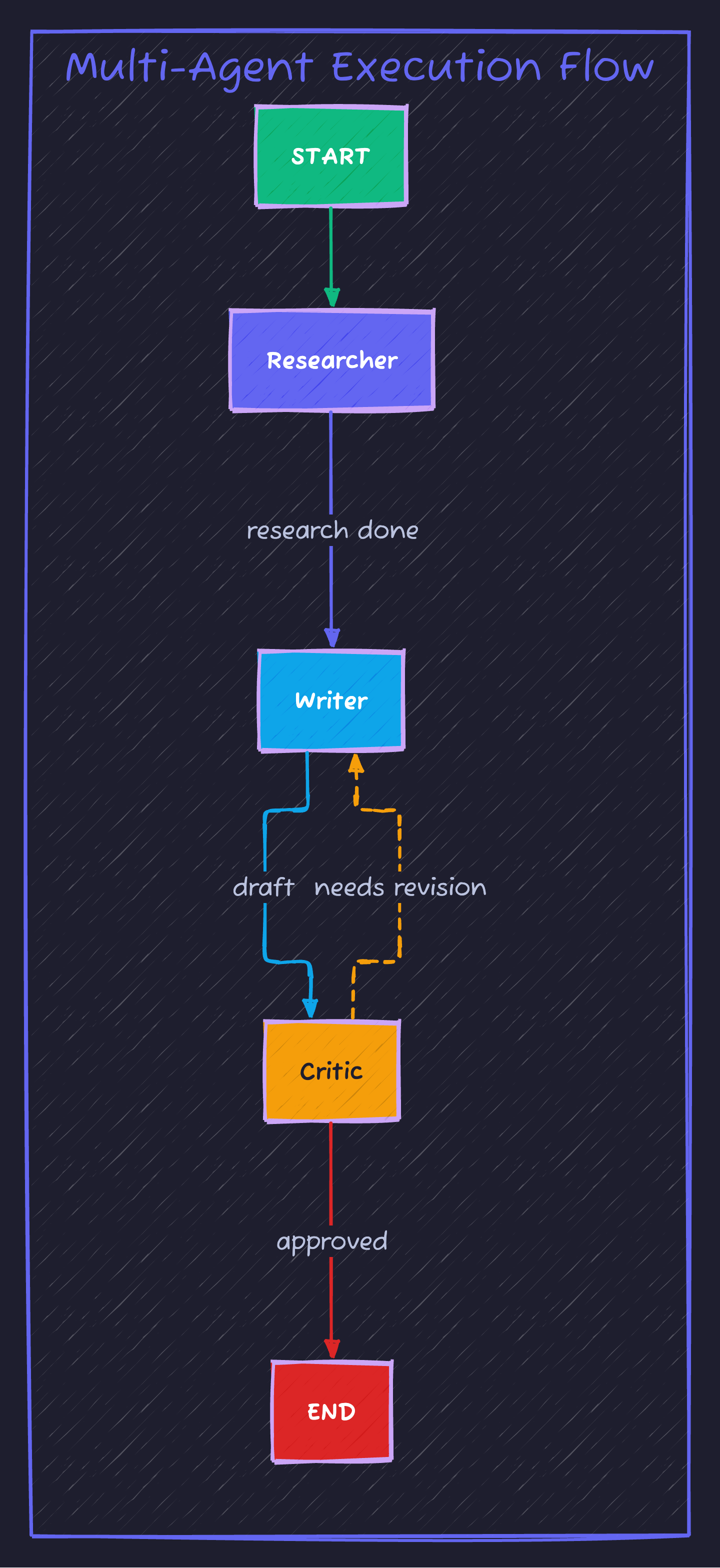
Execution Flow Visualization
Parallel Agent Execution
For independent tasks, run agents in parallel:
# parallel_agents.py
import asyncio
from langchain_openai import ChatOpenAI
from langchain_core.messages import HumanMessage, SystemMessage

llm = ChatOpenAI(model="gpt-4o-mini")

async def research_market(topic: str) -> str:
    """Market research agent."""
    response = await llm.ainvoke([
        SystemMessage(content="You are a market research expert."),
        HumanMessage(content=f"Analyze market trends for: {topic}")
    ])
    return f"[Market Research]\n{response.content}"

async def research_technical(topic: str) -> str:
    """Technical research agent."""
    response = await llm.ainvoke([
        SystemMessage(content="You are a technical research expert."),
        HumanMessage(content=f"Analyze technical aspects of: {topic}")
    ])
    return f"[Technical Research]\n{response.content}"

async def research_competition(topic: str) -> str:
    """Competition analysis agent."""
    response = await llm.ainvoke([
        SystemMessage(content="You are a competitive analysis expert."),
        HumanMessage(content=f"Analyze competition for: {topic}")
    ])
    return f"[Competition Analysis]\n{response.content}"

async def run_parallel_research(topic: str):
    """Run all research agents in parallel."""
    print(f"🚀 Starting parallel research on: {topic}\n")

    # Run all agents simultaneously
    results = await asyncio.gather(
        research_market(topic),
        research_technical(topic),
        research_competition(topic)
    )

    # Combine results
    combined = "\n\n".join(results)

    # Synthesize with another agent
    synthesis = await llm.ainvoke([
        SystemMessage(content="You are a senior analyst. Synthesize research into executive summary."),
        HumanMessage(content=f"Synthesize these findings:\n\n{combined}")
    ])

    return synthesis.content

if __name__ == "__main__":
    result = asyncio.run(run_parallel_research("AI Agent Development Tools"))
    print(result)
Communication Patterns
Message Passing
Agents communicate through shared state or direct messages:
class SharedWorkspace(TypedDict):
    """Shared workspace for agent communication."""
    messages: list  # Chat history
    artifacts: dict  # Shared documents/data
    status: dict    # Agent statuses
    decisions: list # Collective decisions
Voting System
def voting_system(proposals: list[str], voters: list[Agent]) -> str:
    """Agents vote on proposals."""
    votes = {}

    for proposal in proposals:
        votes[proposal] = 0

        for voter in voters:
            response = voter.evaluate(proposal)
            if "approve" in response.lower():
                votes[proposal] += 1

    # Return proposal with most votes
    winner = max(votes, key=votes.get)
    return winner
Best Practices
| Practice | Why |
|---|---|
| Clear roles | Prevents overlap and confusion |
| Specific goals | Agents know exactly what to achieve |
| Iteration limits | Prevents infinite loops |
| Error handling | Graceful failure recovery |
| Logging | Debug and monitor agent behavior |
Anti-Patterns to Avoid
| Anti-Pattern | Problem | Solution |
|---|---|---|
| Too many agents | Coordination overhead | Start with 2-3 agents |
| Vague roles | Agents conflict | Specific, distinct roles |
| No termination | Infinite loops | Max iterations, clear end conditions |
| Shared everything | Context confusion | Minimal shared state |
Summary
| Framework | Best For | Complexity |
|---|---|---|
| CrewAI | Quick multi-agent setups | Low |
| LangGraph | Custom orchestration | Medium |
| Custom | Maximum control | High |
What’s Next?
In Part 6, we’ll learn to deploy these systems to production—monitoring, scaling, security, and reliability.
Continue to Part 6: Production Deployment →
Full Code Repository
git clone https://github.com/Moshiour027/ai-agents-mastery.git
cd ai-agents-mastery/05-multi-agent
pip install -r requirements.txt
python first_crew.py
Advertisement
Moshiour Rahman
Software Architect & AI Engineer
Enterprise software architect with deep expertise in financial systems, distributed architecture, and AI-powered applications. Building large-scale systems at Fortune 500 companies. Specializing in LLM orchestration, multi-agent systems, and cloud-native solutions. I share battle-tested patterns from real enterprise projects.
Related Articles
LangGraph Deep Dive: Build AI Agents as State Machines
Master LangGraph for building production AI agents. Learn state graphs, conditional routing, cycles, and persistence patterns with hands-on examples.
PythonTool-Using AI Agents: Web Search, Code Execution & API Integration
Build powerful AI agents with real-world tools. Learn to integrate web search, execute code safely, work with files, and connect to external APIs using LangGraph.
PythonAI Agents Fundamentals: Build Your First Agent from Scratch
Master AI agents from the ground up. Learn the agent loop, build a working agent in pure Python, and understand the foundations that power LangGraph and CrewAI.
Comments
Comments are powered by GitHub Discussions.
Configure Giscus at giscus.app to enable comments.